Product news 06/2026

Product management improvements
Favourite products
You can now mark menu items as favourites and display them in a separate category at the top of the till. If there are no items in that category, it will be hidden automatically. This gives your staff faster access to the products they use most often, without unnecessary searching.

Products for multiple locations
When creating new products, you can now select multiple locations at once. On a single page, you can view and edit the price, in-app visibility, and other settings for each location individually.
You can also update some values for all selected locations in one go. If you manage several branches, this will save time and help you keep product settings consistent and easy to manage.

Recipe history
The recipe page now includes a full history view. Instead of only showing when a recipe was last edited, it also lets you see what it looked like before.
This is useful when you need to check older settings, review changes, or return to a previous version of a recipe.

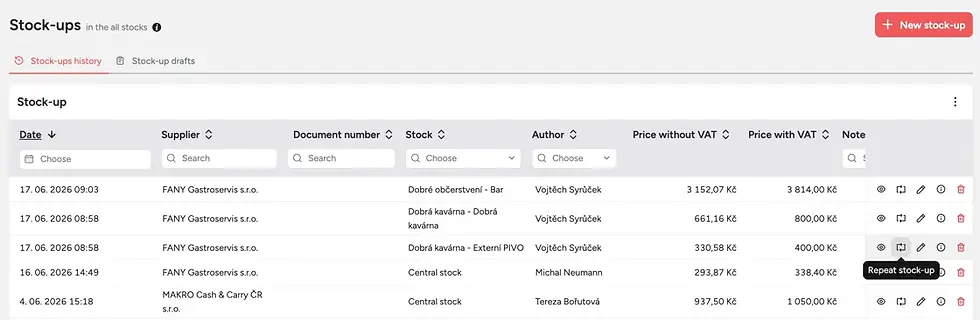
Repeat stock transfers and stock-up
If you often move the same ingredients between stocks or repeat the same stock-up, you can now repeat these actions in just one click . You will find the feature directly in the stock transfer and stock-up section.
In practice, this saves time on routine tasks and reduces manual re-entry.
Filter Bills by item
In the Bills section, you will now find a column showing the items on each bill, as well as a filter by specific item. This makes it easier to find bills where a particular product appeared.
The whole section is also faster and smoother, so it is more comfortable to work with even when handling larger volumes of data.

Upselling in Kiosk
If you use Storyous Kiosk, you can now offer guests additional items through upselling. In the Administration section under Kiosk Settings, you can choose up to four products that will appear in the kiosk as extra recommendations. If you do not select any, the section will stay hidden.
This update also includes automatic syncing of kiosk settings and menu changes. That means any changes you make in Administration will update automatically, so there is no need to turn the kiosk off and on again.


